 Mailroom
Search that understands
Gmail’s search words, like from:, after: and OR, suggested as you type. Keep the searches you use in the sidebar.

Mailroom is a free email client for Mac. It brings Gmail-style conversations to any email account, with your calendar, tasks and chats built in: iMessage, and WhatsApp and more through Beeper. There’s no Mailroom account and no Mailroom server.
120 downloads · Free · macOS 13 or later · Apple silicon and Intel

01
Gmail’s shortcuts, like j, k, e and r, and the Mac ones you already use.
02
Your Mac talks straight to your mail provider, with nothing in between.
03
Draft, proofread, translate, summarize, label new mail, and tidy up by asking, with Apple Intelligence or the model you pick. Or from Claude.
Gmail, Outlook, iCloud, Fastmail, Yahoo or any IMAP server. Type your address and Mailroom finds the settings.

Translate a message, or sum up a long thread in a few lines.

Google Calendar, Outlook or any CalDAV calendar, with invitations you answer in the message. Your tasks sit above each day, to drag to another day or into the hours. Contacts sync too, or stay on your Mac.

iMessage and SMS from Messages on your Mac, and WhatsApp, Telegram, Signal, Instagram, LinkedIn and more through Beeper, in one list beside your inbox.

New mail labels itself: Marketing, News, Social, Pitch and Updates, and labels you describe in your own words. With AI, or with rules on your Mac.

Claude, Cursor and other AI apps on your Mac can use Mailroom through MCP: they search and read your mail, and ask to archive, move, tag or snooze it. Each change waits as a card in Mailroom until you approve it, unless you let them go ahead.

Gmail’s search words, like from:, after: and OR, suggested as you type. Keep the searches you use in the sidebar.
Put a conversation away. It comes back to the top of your Inbox.

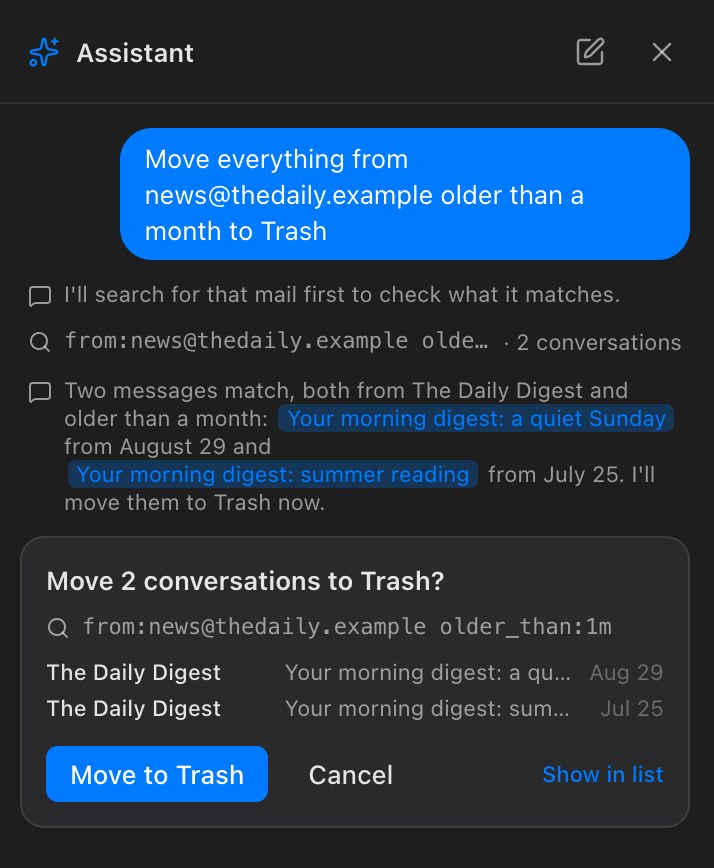
Ask in your own words to find or tidy mail, here or from Claude. Nothing changes until you approve it, unless you let Claude go ahead.
Press ⇧T on any email, as in Gmail, for a task that links back to it. Plan the week by dragging tasks between days in the calendar.

Take a message back for up to 30 seconds.

Clear them for good in one step, after you confirm.

Email links open a new message in Mailroom.
Send from hello@ on your own domain.
Search without a connection, and read the mail you’ve opened.
For all mail, only your contacts, or none, and for chats.
Write now, and it goes tomorrow morning, or whenever you pick.
Messages you send often, a click away.
Keep a busy thread, or a sender, out of your Inbox.
Primary, Marketing, News and the rest, like Gmail’s.
Saved with your mail, where the server allows.
An HTML signature for each account.
A message, or a whole conversation.
Leave a mailing list from the message, often without visiting its site.
Light or dark, accent colour, a text size for each part, and only the buttons you use.
Preview with Quick Look, or save them all as a .zip. Nothing runs.
Mailroom works with your mail server the standard way, so your phone and other mail apps see the same thing. Chats come from Messages and Beeper on your Mac, and stay off until you turn them on.
No Mailroom account, no Mailroom server and no analytics. Here’s what happens to your mail and messages.

Your Mac connects to your mail servers directly, encrypted.
Tracking pixels never load, and other images only when you allow them.
Its scripts and forms can’t run, and it can’t reach into the app.
Your mail and passwords, locked with a Keychain key.
Click a feature, ask the Assistant, turn on Auto Labels or connect an AI app. With a model on your Mac, nothing leaves it.
No usage data, no crash reports, no cookies.
Read from Messages and Beeper on your Mac. No copy kept.
The one thing Mailroom asks our site: is there a new version?
Preview them with Quick Look. Apps and scripts never open.
Something else? Write to support@getmailroom.dev.
Yes. There’s no subscription, no account to make and no paid tier.
On your mail provider’s servers, as it is today, with a copy on your Mac so it’s fast. You can search it offline, and read what you’ve opened. The only other place it goes is the AI service you set up, when you use an AI feature, and then only what that feature needs: the message, conversation or draft you’re working on, or for the Assistant, the sender, subject and date of mail it finds and the conversations it reads to answer you. If you connect an AI app, like Claude, it gets what it finds and reads through Mailroom. With Apple Intelligence, or a model on your Mac, even that stays on your Mac.
Your password is stored on your Mac, encrypted with a key in your Keychain, and only ever sent to your mail provider, or to a sending service you choose, such as Amazon SES. If you sign in with Google, Microsoft or Yahoo, Mailroom doesn’t see your password at all.
iMessage and SMS, from Messages on your Mac. And WhatsApp, Telegram, Signal, Instagram, Messenger, LinkedIn, Slack, Discord and Google Messages through Beeper Desktop, a separate app that connects them. Mailroom starts Beeper in the background when it needs it, and connects with one click. Chats is off until you turn it on in Settings › Chats. See Chats.
Only on your Mac. Mailroom reads your chats from Messages and Beeper on your Mac, keeps no copy of them, and sends your replies through those apps. There’s no Mailroom server for them to go through, and its developer never sees them.
Any Mac with macOS 13 Ventura or later, with Apple silicon or Intel.
Yes. Google Calendar and Outlook Calendar connect with Sign in with Google or Microsoft. If your Gmail signs in with Google, the calendar comes with that sign-in. Otherwise connect it in Settings › Accounts, and your mail keeps signing in as it does now. The calendar also works with CalDAV servers, such as iCloud, Fastmail and Purelymail. Contacts work with any account: kept on your Mac, synced with Outlook through Sign in with Microsoft, or over CardDAV with providers that offer it, such as iCloud and Fastmail.
It shows, organizes and sends your mail, and shows and saves your events, between your Mac and Google. The exceptions are the AI features: when you click one, the text of that message, conversation or draft goes to the AI service you set up, with Auto Labels on with AI, the sender, subject and opening lines of new mail do, and when you ask the Assistant, the sender, subject and date of mail it finds, and the conversations it reads to answer you, do. AI apps you connect on your Mac, like Claude, get what they find and read. Mailroom has no server, its developer never sees your data, and none of it is used for ads or to train AI. The privacy policy says exactly what Mailroom asks Google for, and why.
From AI apps on your Mac, yes: Claude Desktop, Claude Code, Cursor, VS Code and others that speak MCP. Turn on AI apps in Settings › AI, and they can search and read your mail and ask to tidy it, with each change waiting for your OK in Mailroom unless you turn that off. Claude on the web or your phone and ChatGPT can’t reach it, because Mailroom has no server: your mail stays between your Mac and your provider. See AI apps.
Yes, on a Mac with Apple silicon and macOS 26 or later. Choose Apple Intelligence in Settings › AI, and Reply with AI, Proofread, Translate, Summarize, Auto Labels and the Assistant use Apple’s model on your Mac, as Apple Mail does. There’s no key to paste and nothing to pay, and your mail never leaves your Mac. More about Apple Intelligence.
Yes. Mailroom works with your mail server the standard way, over IMAP, so what you read, star, move and delete, and your drafts and sent mail, are saved on the server. Your phone and other mail apps see the same thing. Tags are saved there too when your server allows it, but most phone mail apps don’t show them.
A snoozed conversation waits in a Snoozed folder on your mail server, so it’s out of your Inbox on your phone too. Mailroom moves it back to your Inbox when it’s due. If your Mac is off or Mailroom is closed then, it comes back the next time Mailroom opens.
Not yet. Mailroom is a Mac app.
No account to make and no server in between. For macOS 13 or later, on Apple silicon and Intel.