 Mailroom
Help · AI features
AI apps (MCP)
Updated
Let Claude, Cursor and other AI apps on your Mac find and tidy your mail. Changes wait for your OK.
Claude, Cursor and other AI apps on your Mac can use Mailroom with the same tools as the Assistant, through MCP (the Model Context Protocol). Ask Claude to "archive the newsletters in my Inbox", or "what did Maya say about the invoice?", and it searches and reads your mail in Mailroom.
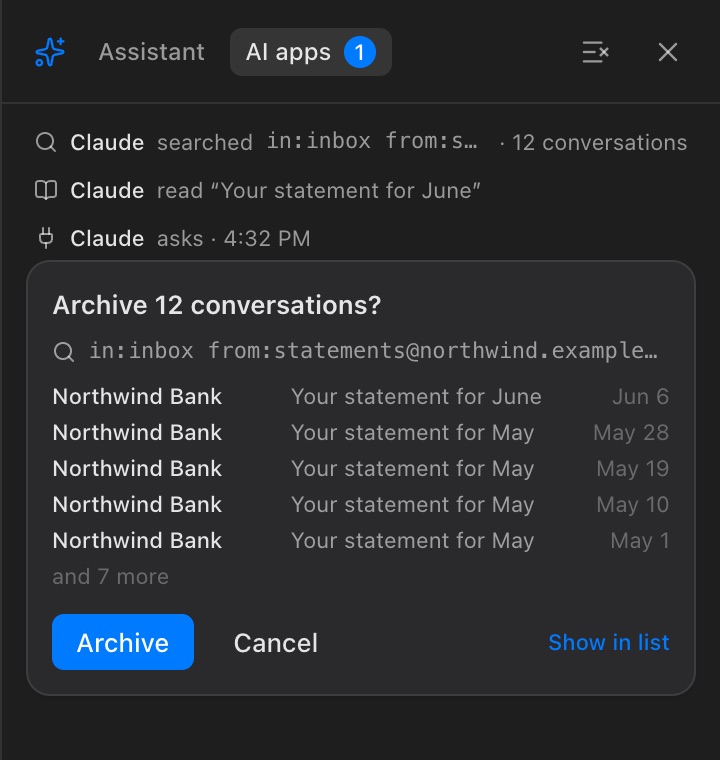
Changes wait for you. When an app asks to change mail, Mailroom shows a card with its own count of the mail and what will happen, and nothing changes until you approve it in Mailroom. You can turn that off, and let apps change mail as soon as they ask.
Turn it on
In Settings › AI › AI apps, check Let AI apps on this Mac use Mailroom. Mailroom makes a key for your apps, kept encrypted with your Keychain, and answers them at http://127.0.0.1:6245/mcp, on your Mac only.
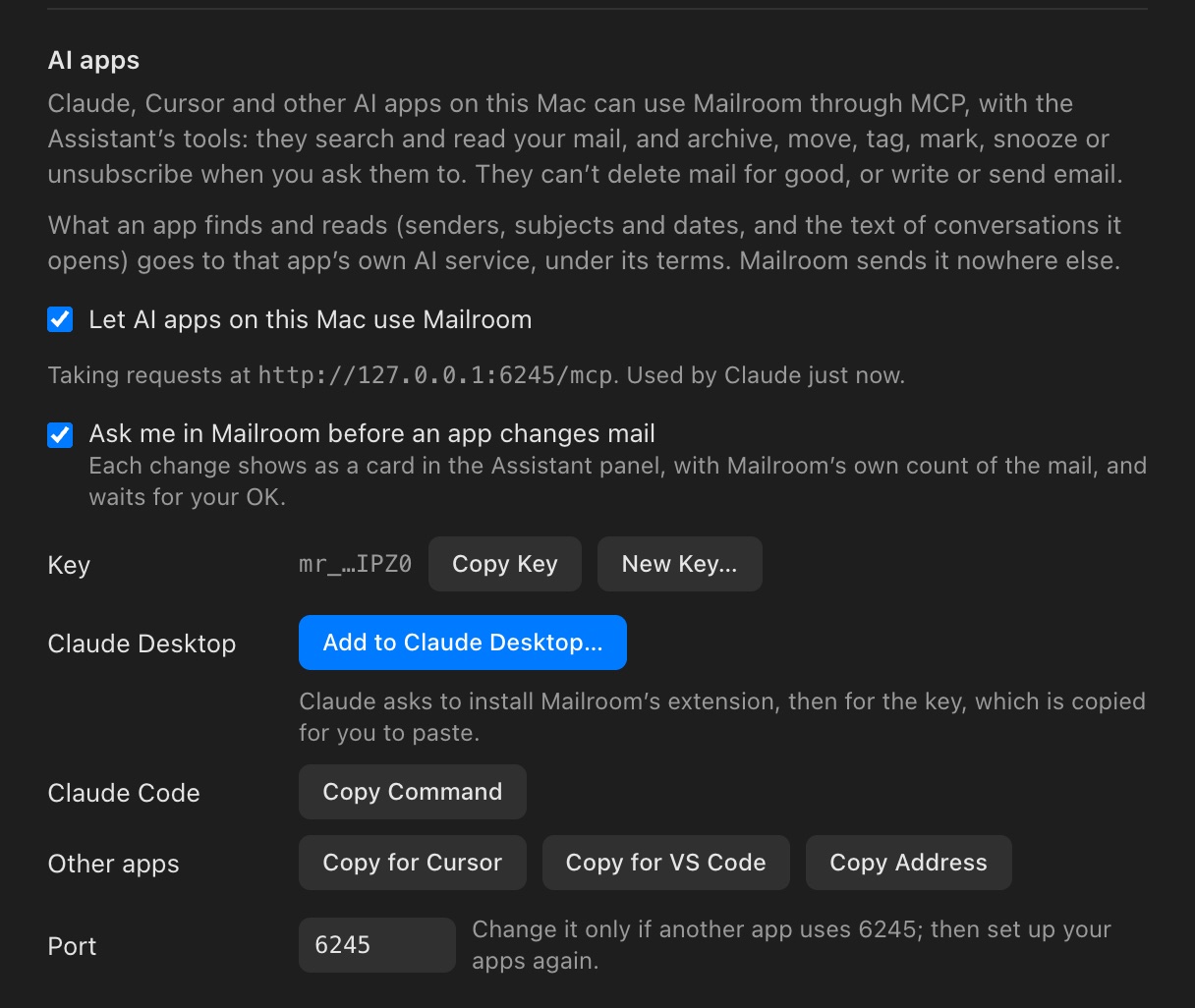
Then connect your app:
| App | How |
|---|---|
| Claude Desktop | Click Add to Claude Desktop…, and Claude asks to install Mailroom’s extension, then for the key. Mailroom has copied it: paste it. |
| Claude Code | Click Copy Command, paste it in Terminal and press Return. |
| Cursor, Windsurf, LM Studio | Click Copy for Cursor, and paste it into the app’s mcp.json. |
| VS Code | Click Copy for VS Code, and paste it into mcp.json. |
| Other apps | Any app that connects to MCP servers over HTTP: use Copy Address, and send the key as a bearer token, Authorization: Bearer <key>. |
What an app can do
It can search your mail, with the same words and operators as the search box, and read the conversations it finds. It can ask to move mail to Trash, archive it, move it to a folder, tag it, mark it read or unread, star it, snooze it, or unsubscribe from a list. It can’t delete mail for good, empty Trash, or write or send email, and it can’t change Mailroom’s settings.
Approving a change
When an app asks for a change, Mailroom opens the Assistant panel on AI apps with a card, like Archive 12 conversations?, showing the search it used and the newest few. If Mailroom isn’t in front, a notification says so. Click the button to do it, with Undo for a few seconds after, or Cancel. Show in list puts the same search in the search box, to look through all of it first.
The app hears what you decided. If you take longer than about 45 seconds, it’s told the card is still waiting in Mailroom, and it can ask again later. A card nobody answers is withdrawn after an hour.
The AI apps view also lists what each app searched and read, under its name. The clear button takes away what’s done.
Without asking. Uncheck Ask me in Mailroom before an app changes mail, and apps change mail as soon as they ask. The app’s own permission prompt is then your only check, so leave it on if you’ve told an app to always allow Mailroom’s tools. Each change still shows in the AI apps view, with Undo for a few seconds if Mailroom is in front.
Privacy
- On your Mac only. Mailroom answers apps on this Mac that have the key. Web pages and other computers can’t reach it, and nothing goes through a server of Mailroom’s. Claude Desktop’s extension reaches Mailroom through a private connection in Mailroom’s own folder, which only your Mac account can open.
- What an app reads goes to that app. The senders, subjects and dates of mail it finds, and the text of conversations it reads, go to the app, and from there to its own AI service, under its terms. Attachments and images are never sent.
- Only connect apps you trust. An email can contain text written to trick an AI. Mailroom tells apps that email is data, not instructions, and changes wait for you unless you turn that off, but an app may have other tools of its own.
Good to know
- Mailroom has to be open. Apps reach Mailroom while it’s running. The Claude Desktop extension opens Mailroom in the background when Claude needs it.
- Claude on the web or your phone, and ChatGPT, can’t use it. They can only reach servers on the internet, and Mailroom has none: your mail stays between your Mac and your provider.
- The key. Copy Key copies it again. New Key… makes a new one, and apps with the old key are turned away until you give them the new one.
- Port. If another app already uses 6245, Mailroom says so: choose another port, then set your apps up again. If you didn’t expect another app there, make a new key too.
- If an app can’t connect, check that Mailroom is open with AI apps on, and that the app has the current key. In Claude Desktop, the key is in Mailroom’s extension settings.
Still stuck? or email support@getmailroom.dev. A person reads every message.