 Mailroom
Help · Chats
Chats
iMessage, WhatsApp, Telegram, Signal and more, next to your mail.
Chats puts your conversations next to your mail: iMessage and SMS from Messages on this Mac, and WhatsApp, Telegram, Signal, Instagram, Messenger, LinkedIn, Slack, Discord and Google Messages through Beeper Desktop.
Each is off until you turn it on in Settings › Chats:
- iMessage and SMS: see iMessage and SMS.
- WhatsApp and the others: see WhatsApp, Telegram, Signal and more.
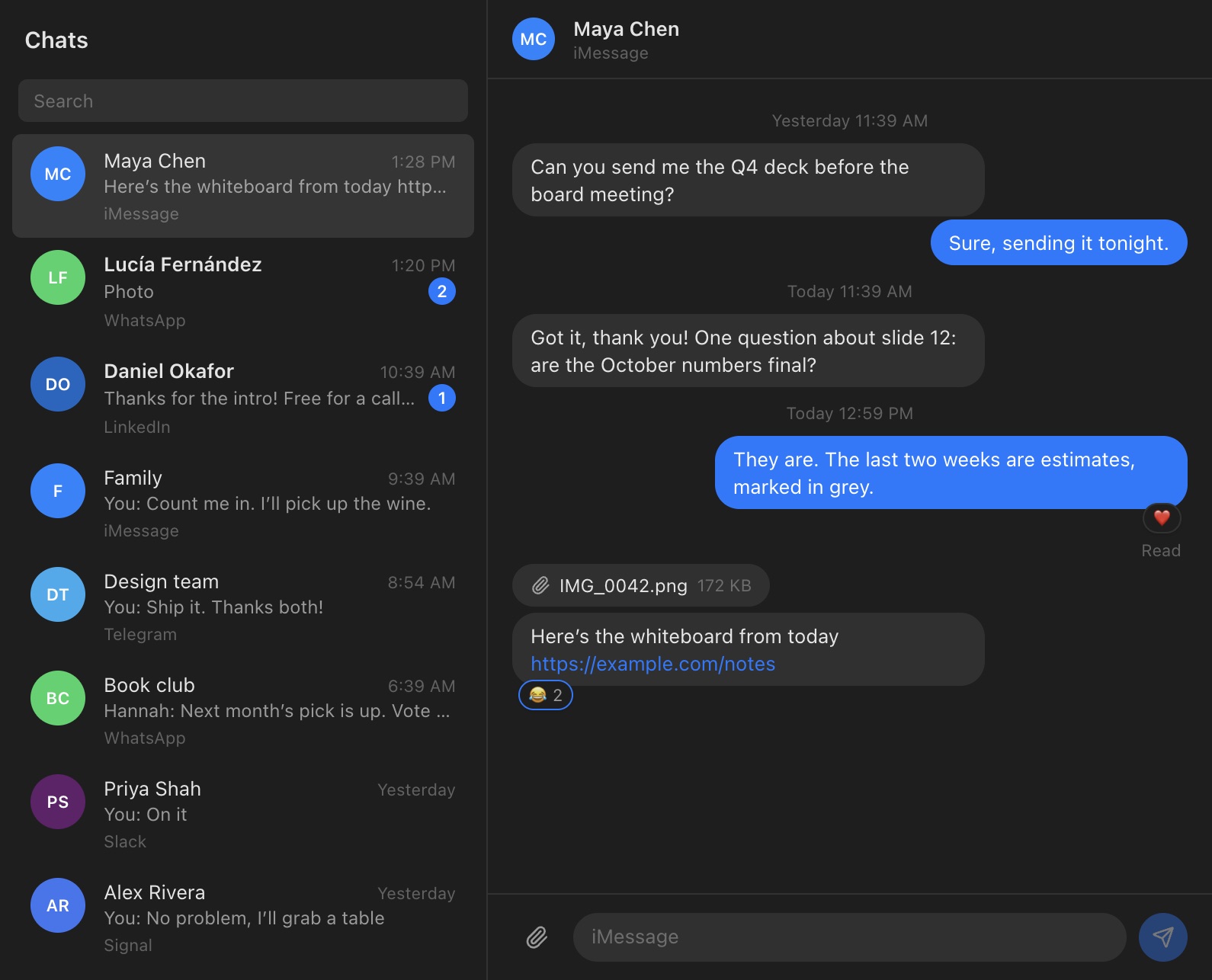
Then click Chats in the sidebar, press g then m, or choose Mailbox › Go to Chats (⌃⌘4). Your chats from every network are in one list, the most recent first, with the network under each name. Type in Search (or press /) to find a chat by name or by its last message.
Reading and replying
Click a chat to read it. Earlier messages at the top loads more. Under your last message, Mailroom shows whether it was delivered or read, where the network says so. Reactions, such as an iMessage tapback or a 👍 on WhatsApp, show under the message they’re on; point at one to see who reacted.
Type your reply and press Return to send it. ⇧Return starts a new line. For emoji, click the smiley by the message box, or press ⌃⌘Space.
Reply with AI
Click the sparkles button by the message box, add what the reply should say if you like, and click Draft reply. The draft goes in the message box, building on anything you’ve typed, for you to edit and send. It reads the chat’s latest messages (up to 30), with the AI you set up in Settings › AI. See AI features.
Photos and files
- Send: click the paperclip, pick up to 10 files (up to 100 MB each), and click Send. Add text too if you like; it goes after the files.
- Open: click a photo or file in a conversation to see it in Quick Look. Apps, scripts and web pages aren’t shown, as with mail.
Unread messages
The number next to Chats in the sidebar is how many messages you haven’t read.
- WhatsApp and the others: opening a chat marks it read in Beeper, and on your phone. If your read receipts are on, the other person can see you’ve read it.
- iMessage: Messages keeps its own read state, and Mailroom can’t change it. A chat you read in Mailroom stops counting as unread here, but Messages still shows it as unread until you open it there.
What Chats doesn’t do yet
Starting a new conversation, adding reactions, replying to one message in particular, editing or unsending, and notifications for new messages. Use Messages or Beeper for those for now.
Privacy
Mailroom keeps no copy of your messages. It reads them from Messages or Beeper on this Mac, and sends your replies through them. Nothing goes through a Mailroom server: there isn’t one. See Privacy and where your data is.
Still stuck? or email asavytski@gmail.com. A person reads every message.