 Mailroom
Help · AI features
The Assistant
Ask in your own words to find, read or tidy mail. Nothing changes until you approve it.
The Assistant finds and tidies mail when you ask in your own words. Press ⌘J, or click the sparkles above the message list, and type what you want:
- "Move newsletters older than a month to Trash"
- "Archive everything from noreply@github.com"
- "Tag emails about invoices as Receipts"
- "Mark everything in my Inbox from last week as read"
- "What did Maya say about the invoice?"
Nothing changes until you say so. The Assistant searches first. When it wants to change mail, it shows a card with how many conversations it found, the newest few, and what it will do, like Move 1,284 conversations to Trash? Click the button to do it, or Cancel. Show in list puts the same search in the search box, so you can look through all of it first. The change happens the way it does when you make it yourself, with Undo for a few seconds after.
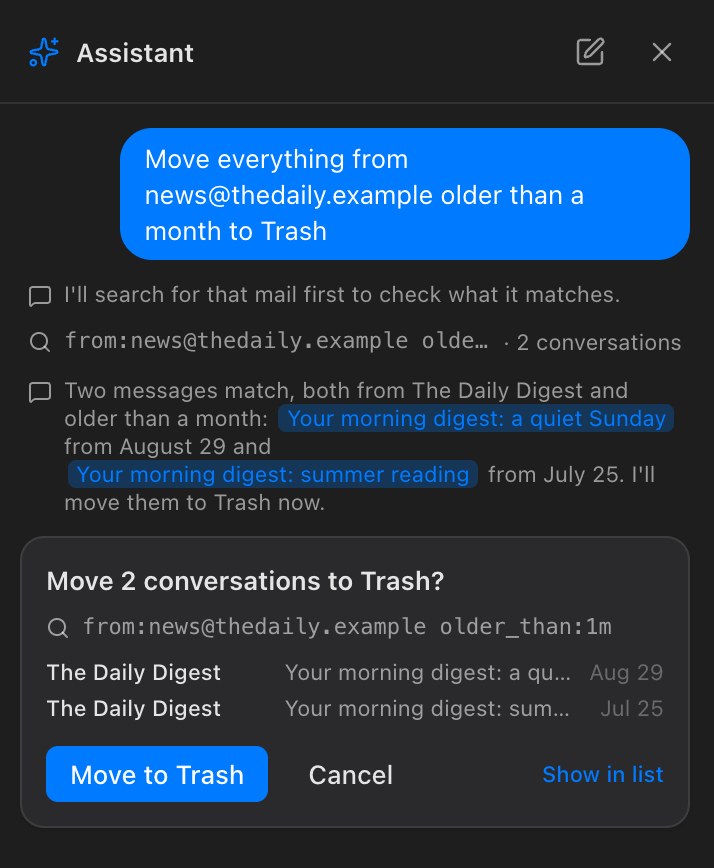
It can move mail to Trash, archive it, move it to a folder, add or remove a tag, mark it read or unread, star it, snooze it, and unsubscribe from a list. It can’t delete mail for good, empty Trash, or write or send email. One card changes up to 10,000 messages; ask again for the rest.
Questions. Ask what an email or a conversation said, and the Assistant reads the ones it needs and answers. Click a conversation it mentions to open it.
Searches. The Assistant writes searches in the search box’s own language (search), so a card’s search is one you can type yourself. If you have more than one account, account:Work keeps a search to one of them. While Mailroom is still downloading older mail for an account, the card says so: older mail isn’t on your Mac yet, so it isn’t counted.
What it sends. It works with the AI you set up in Settings › AI, with a model that can use tools (Settings › AI says whether yours can). It sends the model your requests, the names of your accounts, folders and tags, and the sender, subject and date of mail its searches find. It reads an email’s text only to answer a question about it. Attachments and images are never sent. With a model on your own Mac, nothing leaves it.
New conversation starts over. The conversation isn’t saved, and it’s gone when Mailroom quits.
Still stuck? or email support@getmailroom.dev. A person reads every message.